
Data Lineage in DuckDB: How duck_lineage Tracks Every Query
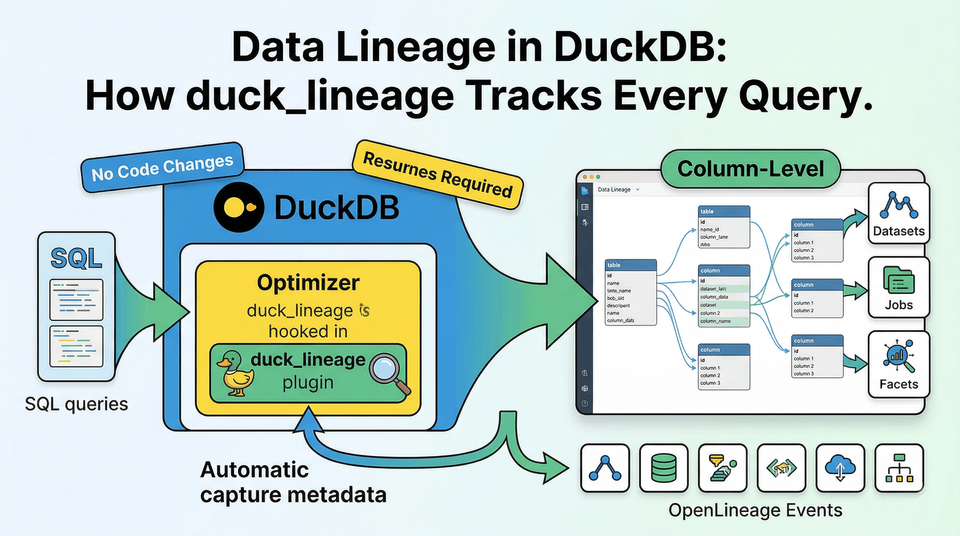
Every Query Leaves a Trail - If You Capture It
A data engineer builds a revenue report in DuckDB. The pipeline reads from two source tables, joins them, aggregates the results, and writes the output. A week later, someone asks: which upstream tables feed the revenue report? Did anything change since last Tuesday?
Without lineage, the answer lives in scattered SQL files and tribal knowledge. With duck_lineage, every query answers those questions automatically.
LOAD duck_lineage;
SET duck_lineage_url = 'http://localhost:5000/api/v1/lineage';
SET duck_lineage_namespace = 'production';

-- Source tables
CREATE TABLE orders (order_id INT, customer_id INT, amount DECIMAL);
CREATE TABLE customers (customer_id INT, name VARCHAR, region VARCHAR);

-- Build the report
CREATE TABLE revenue_by_region AS
SELECT c.region, COUNT(o.order_id) AS total_orders, SUM(o.amount) AS revenue
FROM orders o
JOIN customers c ON o.customer_id = c.customer_id
GROUP BY c.region;
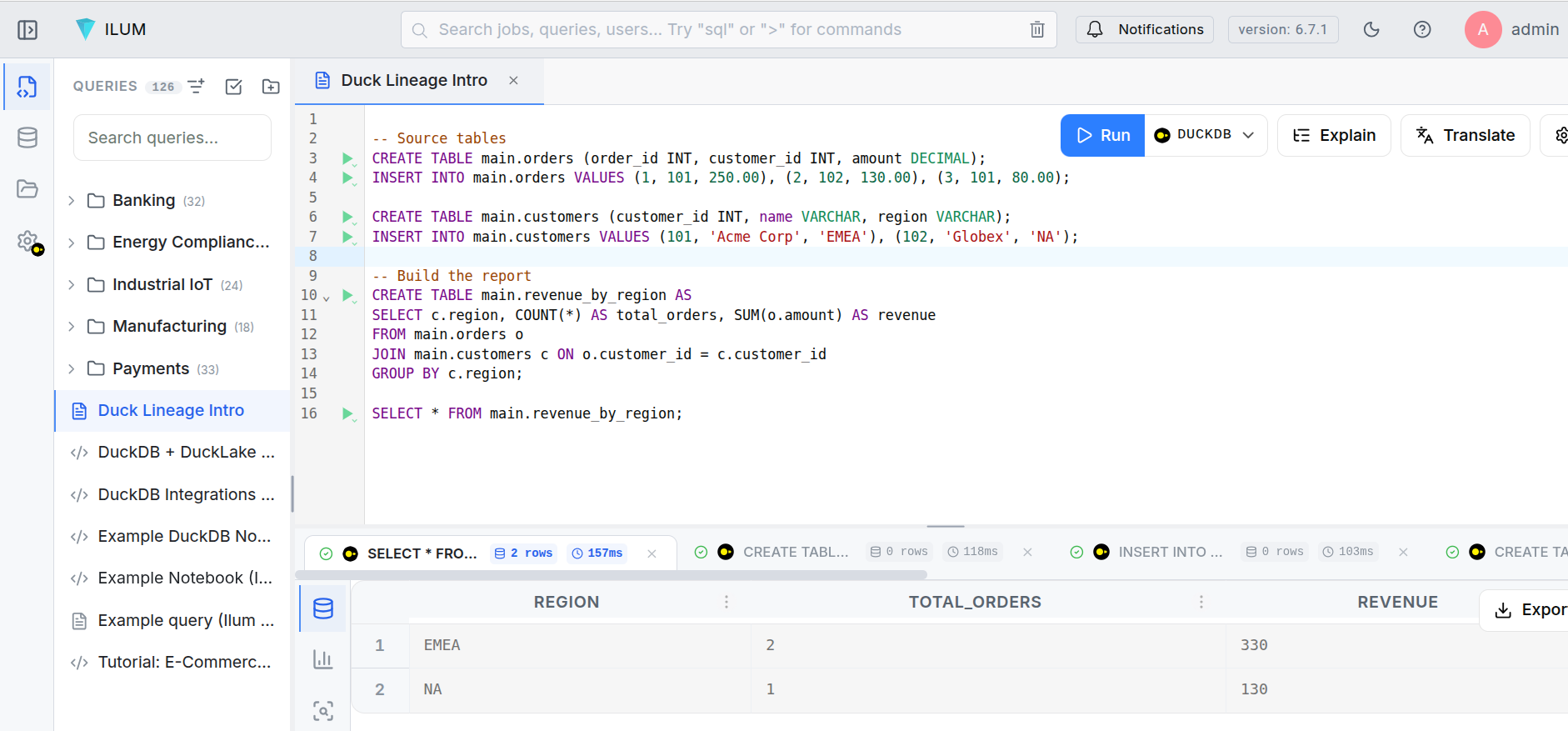
After those statements execute, three things have happened that the engineer never had to think about:
- A START event was emitted for each query, capturing the SQL text, input tables, output tables, and full schema metadata.
- Each query's result was counted row-by-row through a transparent sentinel operator.
- A COMPLETE event was emitted with the row count and execution status.
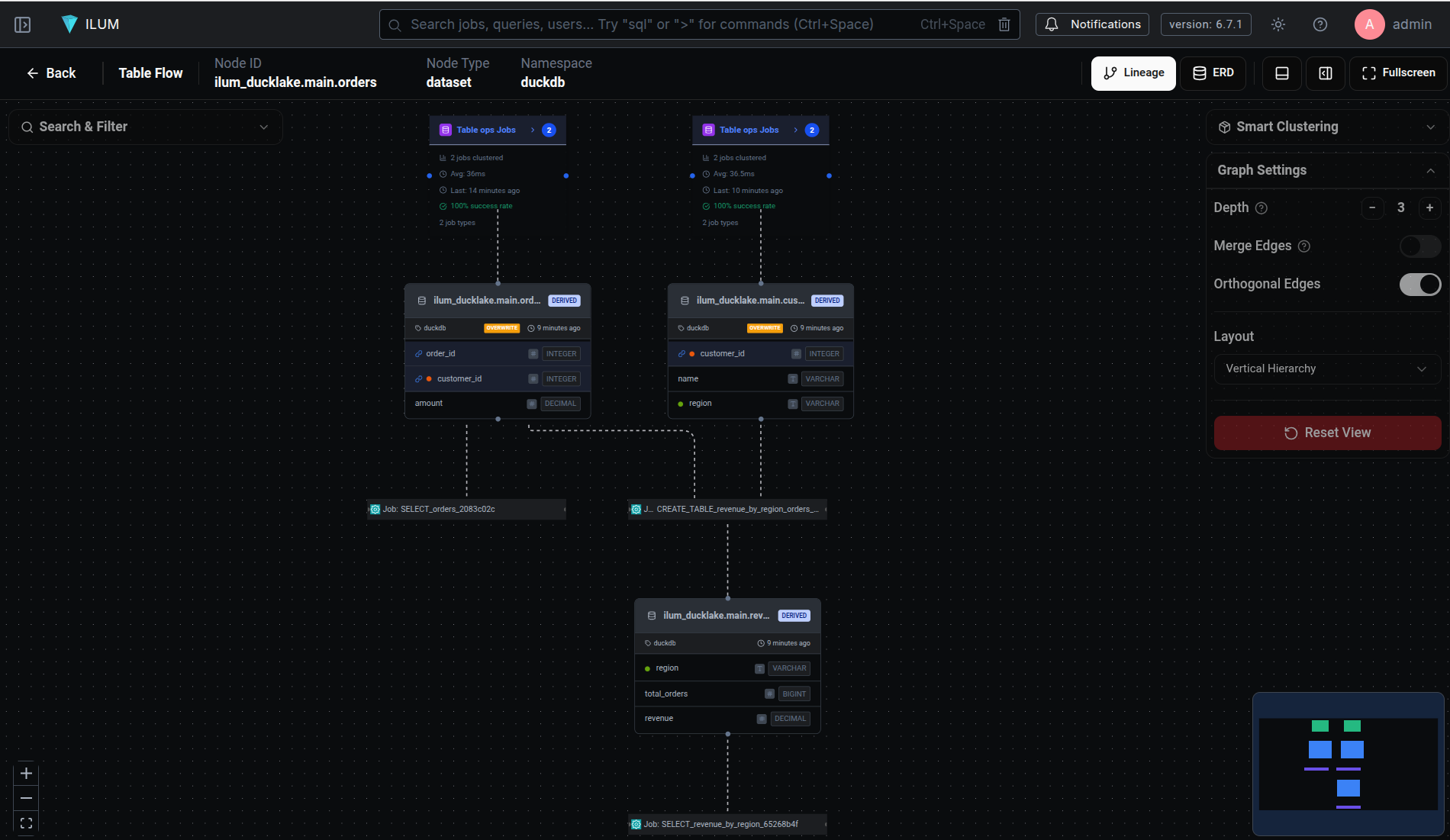
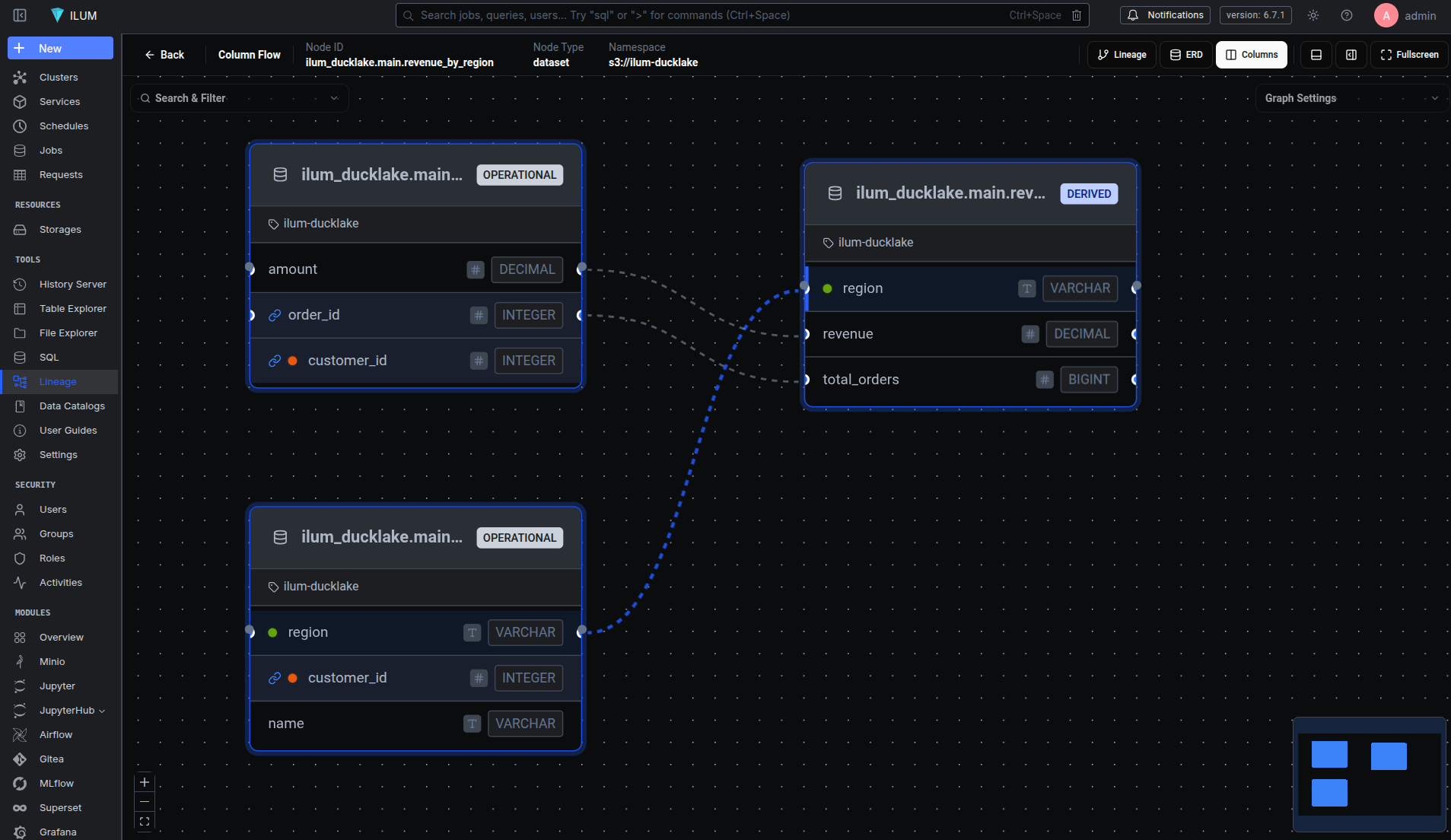
No SDK. No wrapper functions. No application changes. The lineage backend (ilum, in this case) now has a directed graph: orders and customers flow into revenue_by_region, with column-level mappings showing that revenue derives from orders.amount and region passes through from customers.region.
Intercepting the Plan Before DuckDB Optimizes It
The core mechanism behind duck_lineage is a single hook into DuckDB's query pipeline. DuckDB's extension API lets you register an OptimizerExtension with a pre_optimize_function - a callback that runs on every query's logical plan after binding but before the cost-based optimizer rewrites it.
OptimizerExtension extension;
extension.pre_optimize_function = DuckLineageOptimizer::PreOptimize;
config.optimizer_extensions.push_back(extension);
The timing matters. At the pre-optimization stage, the logical plan still maps cleanly to the user's SQL intent. A LogicalGet operator means "read from this table." A LogicalInsert means "write to this table." A LogicalCreateTable means "create this table." After the optimizer runs, DuckDB may rewrite, reorder, or eliminate these operators entirely. We need the plan before that happens.
Every query that flows through DuckDB goes through a three-phase lifecycle:
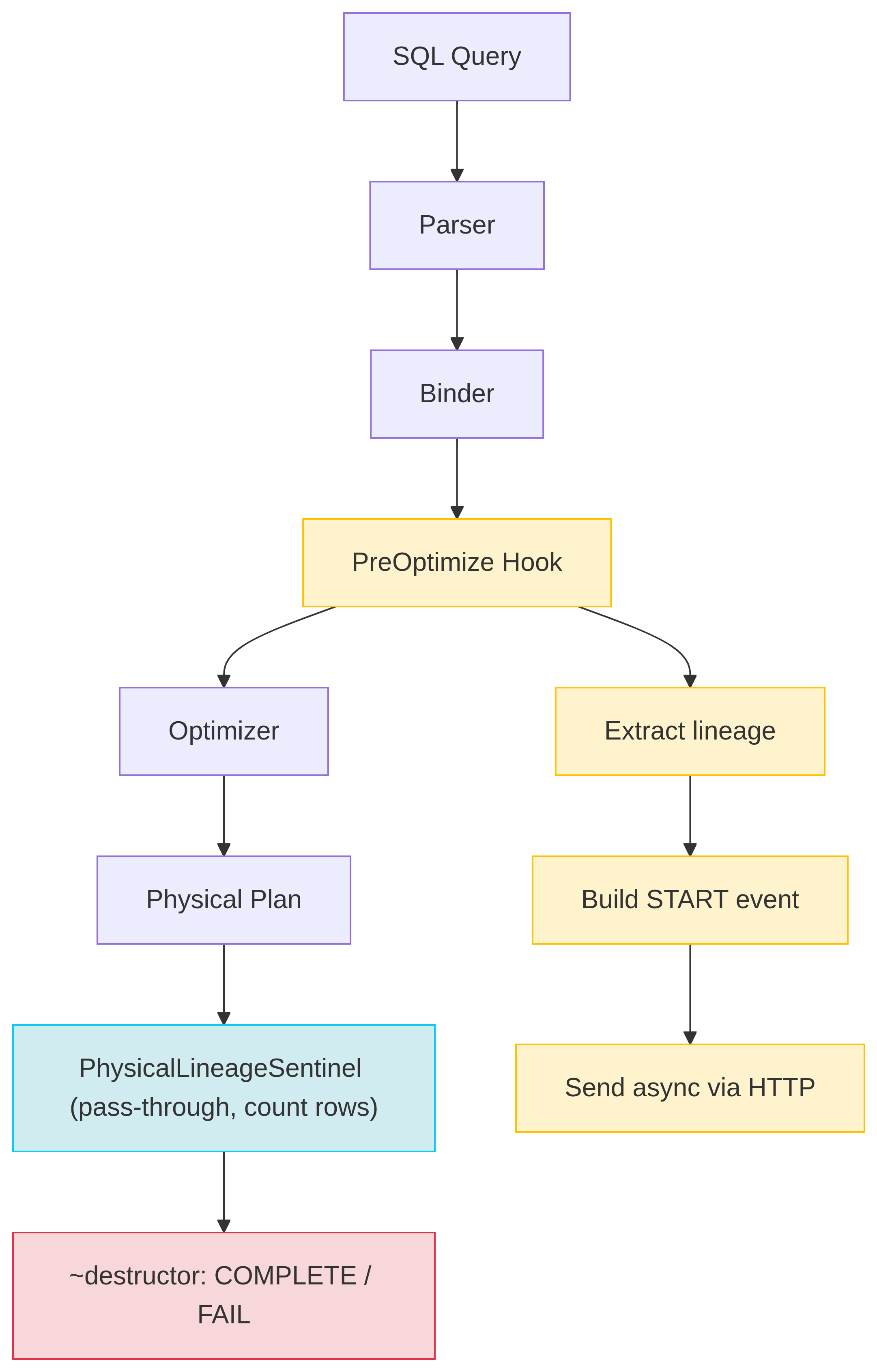
Phase 1: PreOptimize. The hook traverses the logical plan tree. It collects every input dataset (from LogicalGet nodes) and output dataset (from LogicalInsert, LogicalCreateTable, LogicalCopyToFile, etc.). For each dataset, it extracts the full schema - column names and types - directly from the DuckDB catalog. It generates a UUID v7 run ID and a deterministic job name (a SHA-256 hash of the query). Then it builds an OpenLineage START event and sends it asynchronously. Finally, it wraps the entire logical plan inside a LogicalLineageSentinel operator.
Phase 2: Execute. During physical planning, the sentinel converts to a PhysicalLineageSentinel. This operator sits at the root of the physical plan and does almost nothing: it references each data chunk from its child (zero-copy), atomically increments a row counter, and requests more input. The query runs at full speed.
chunk.Reference(input);
sentinel_state.rows_processed += chunk.size();
return OperatorResultType::NEED_MORE_INPUT;
Phase 3: Destruct. When the PhysicalLineageSentinel is destroyed - either because the query finished or because an exception is unwinding the stack - its destructor fires. It checks std::uncaught_exception() to determine whether the query succeeded or failed, builds a COMPLETE or FAIL event with the final row count, and sends it to the backend. The destructor catches all exceptions internally, because destructors must never throw.
This design means lineage capture is guaranteed: even if a query is interrupted, the sentinel's destructor still fires and reports the failure.
What an OpenLineage Event Contains
Each query produces at least two events: a START at the beginning and a COMPLETE (or FAIL) at the end. Here's what a START event looks like for the revenue report query above (facet-level _producer and _schemaURL fields omitted for brevity):
{
  "eventType": "START",
  "eventTime": "2026-04-08T14:23:01.847293Z",
  "producer": "https://github.com/ilum-cloud/duck_lineage",
  "schemaURL": "https://openlineage.io/spec/2-0-2/OpenLineage.json#/$defs/RunEvent",
  "run": {
    "runId": "019587a3-4e2f-7bc1-a892-3f4d5e6a7b8c",
    "facets": {
      "processing_engine": {
        "name": "DuckDB",
        "version": "1.5.1"
      }
    }
  },
  "job": {
    "namespace": "production",
    "name": "CREATE_TABLE_AS_orders_customers_revenue_by_region_a3f8c012",
    "facets": {
      "sql": {
        "query": "CREATE TABLE revenue_by_region AS SELECT c.region, COUNT(*) ..."
      }
    }
  },
  "inputs": [
    {
      "namespace": "production",
      "name": "memory.main.orders",
      "facets": {
        "schema": {
          "fields": [
            { "name": "order_id", "type": "INTEGER" },
            { "name": "customer_id", "type": "INTEGER" },
            { "name": "amount", "type": "DECIMAL" }
          ]
        },
        "catalog": { "name": "memory", "type": "memory", "framework": "duckdb" },
        "datasetType": { "datasetType": "TABLE" }
      }
    },
    {
      "namespace": "production",
      "name": "memory.main.customers",
      "facets": {
        "schema": {
          "fields": [
            { "name": "customer_id", "type": "INTEGER" },
            { "name": "name", "type": "VARCHAR" },
            { "name": "region", "type": "VARCHAR" }
          ]
        },
        "catalog": { "name": "memory", "type": "memory", "framework": "duckdb" },
        "datasetType": { "datasetType": "TABLE" }
      }
    }
  ],
  "outputs": [
    {
      "namespace": "production",
      "name": "memory.main.revenue_by_region",
      "facets": {
        "schema": {
          "fields": [
            { "name": "region", "type": "VARCHAR" },
            { "name": "total_orders", "type": "BIGINT" },
            { "name": "revenue", "type": "DECIMAL" }
          ]
        },
        "lifecycleStateChange": { "lifecycleStateChange": "CREATE" },
        "datasetType": { "datasetType": "TABLE" }
      }
    }
  ]
}
A few things to notice:
Job naming is deterministic. The job name follows the pattern STATEMENT_TYPE_table1_table2_..._hash8, where the hash is the first 8 characters of a SHA-256 of the normalized query. Identical queries always produce the same job name, so Marquez groups their runs into a single job with full execution history.
Run IDs are UUID v7. These are timestamp-ordered (the first 48 bits encode milliseconds since epoch), so they sort naturally by creation time without needing an additional timestamp index.
Schemas come from the catalog, not the query text. The extension reads column names and types from DuckDB's internal catalog metadata, which means they're always accurate - even for complex types like STRUCT, MAP, or arrays.
Lifecycle states track DDL. The lifecycleStateChange facet distinguishes between CREATE, DROP, ALTER, RENAME, OVERWRITE (for INSERT/UPDATE), and TRUNCATE. This means you can track schema evolution over time, not just data flow.
Tracing Columns Through Joins, Aggregates, and Window Functions
Dataset-level lineage tells you which tables feed a report. Column-level lineage tells you which fields and how they're transformed. The ColumnLineageExtractor handles this by walking the logical plan bottom-up, building a map from each column binding to its source columns.
The algorithm works in a single pass:
- HandleGet seeds the map. For each table scan, it creates an entry mapping each
ColumnBinding(a packedtable_index << 32 | column_index) to its source table and column name. - HandleProjection resolves expressions recursively. A simple column reference propagates its source. A function call (
SUM,CONCAT, etc.) collects sources from all its arguments. - HandleJoin merges the binding maps from both sides of the join, respecting projection maps for left and right children.
- HandleAggregate splits columns into two categories: GROUP BY columns are marked as DIRECT (they pass through unchanged), while aggregate expressions (
SUM,COUNT,AVG) are marked as INDIRECT (the value is transformed).
Consider this query:
CREATE TABLE revenue_by_region AS
SELECT c.region, COUNT(o.order_id) AS total_orders, SUM(o.amount) AS revenue
FROM orders o
JOIN customers c ON o.customer_id = c.customer_id
GROUP BY c.region;
The resulting columnLineage facet in the output dataset looks like this:
{
  "columnLineage": {
    "fields": {
      "region": {
        "inputFields": [
          { "namespace": "production", "name": "memory.main.customers", "field": "region" }
        ],
        "transformationType": "DIRECT"
      },
      "total_orders": {
        "inputFields": [
          { "namespace": "production", "name": "memory.main.orders", "field": "order_id" }
        ],
        "transformationType": "INDIRECT"
      },
      "revenue": {
        "inputFields": [
          { "namespace": "production", "name": "memory.main.orders", "field": "amount" }
        ],
        "transformationType": "INDIRECT"
      }
    }
  }
}
region is DIRECT - it passes through from customers.region without transformation. total_orders and revenue are INDIRECT - they derive from orders.order_id (through COUNT) and orders.amount (through SUM) respectively. The extractor also handles window functions, CASE expressions, type casts, and nested function calls, recursively collecting all contributing source columns.
Views: Tracking What the User Wrote, Not What DuckDB Expanded
DuckDB expands view references during the binding phase - before the optimizer hook runs. By the time PreOptimize sees the logical plan, a query like SELECT * FROM active_users has already been rewritten to SELECT * FROM users WHERE active = true. The view is gone; only the underlying table scan remains.
This is a problem for lineage. The user thinks in terms of views, not their expanded definitions. If someone queries active_users, the lineage graph should show active_users as the input - not users.
We solve this by re-parsing the original SQL query to detect view references. When a query arrives at PreOptimize, the extension:
- Checks if the SQL text contains FROM or JOIN keywords (quick filter to avoid unnecessary parsing).
- Re-parses the SQL with DuckDB's
Parserto extract table references. - Looks up each reference in the catalog to determine if it's a view.
- For each view found, extracts its dependencies and schema information.
- Adds the view as an input dataset with
datasetType: "VIEW", and excludes the view's underlying tables from the input list.
CREATE TABLE base_data (id INT, name VARCHAR, active BOOLEAN);
CREATE VIEW active_records AS SELECT id, name FROM base_data WHERE active;

-- Lineage shows active_records as input, not base_data
CREATE TABLE report AS SELECT * FROM active_records;
One limitation: this only works when the original SQL string is available. Queries executed via prepared statements (common in JDBC or SQLAlchemy) don't expose the query text, so view grouping falls back to showing the underlying tables.
Zero-Impact Delivery: Background Thread with Backoff
Lineage should never slow down queries. The LineageClient is a singleton with a dedicated background worker thread that handles all HTTP delivery independently of query execution.
When SendEvent() is called, the event JSON is pushed onto a lock-guarded queue and the worker thread is notified via a condition variable. The worker dequeues events and POSTs them to the configured OpenLineage backend using CURL. If the backend is unavailable, the client retries with exponential backoff (starting at 100ms, doubling each attempt). It retries on 5xx server errors and 429 rate limits, but skips retries on 4xx client errors.
If the queue fills up (default: 10,000 events), new events are dropped and a counter is incremented. The extension never blocks, never crashes, and never interferes with query execution.
-- Tune delivery behavior
SET duck_lineage_max_retries = 5;
SET duck_lineage_max_queue_size = 50000;
SET duck_lineage_timeout = 15;
SET duck_lineage_debug = true;  -- Print events to stdout
Beyond Tables: Files, Hive Metastore, and DuckLake
DuckDB is not just an in-memory SQL engine. It reads Parquet and CSV files from local disk and S3, attaches external databases, and integrates with catalog services like Hive Metastore and DuckLake. The extension handles all of these, resolving the correct namespace and dataset name for each catalog type.
| Catalog Type | Namespace | Dataset Name Example |
|---|---|---|
| In-memory | Configured namespace (e.g., production) |
memory.main.orders |
| Attached file | Configured namespace | file_db.main.users |
| CSV/Parquet read | file |
/data/warehouse/events.parquet |
| COPY TO file | file |
/tmp/export/report.csv |
| Hive Metastore | HMS storage location | hms_catalog.default.transactions |
| DuckLake | S3 data path | ducklake.main.analytics_table |
This means a single lineage graph can show data flowing from an S3 Parquet file through a DuckLake catalog table into an in-memory aggregation - with full schema metadata at every step.
Linking DuckDB Runs to Airflow and Dagster
When DuckDB runs inside an orchestrator like Airflow or Dagster, individual query runs should link back to the parent pipeline run. The extension checks three environment variables on every event:
export OPENLINEAGE_PARENT_RUN_ID="019587a1-2c3d-7e8f-9a0b-1c2d3e4f5a6b"
export OPENLINEAGE_PARENT_JOB_NAMESPACE="airflow"
export OPENLINEAGE_PARENT_JOB_NAME="etl_pipeline.revenue_task"
When set, every START and COMPLETE event includes a parent facet under run.facets:
{
  "parent": {
    "run": { "runId": "019587a1-2c3d-7e8f-9a0b-1c2d3e4f5a6b" },
    "job": {
      "namespace": "airflow",
      "name": "etl_pipeline.revenue_task"
    }
  }
}
In Marquez, this links the DuckDB query runs as children of the Airflow task run. You get end-to-end lineage from orchestrator to engine to table, in a single graph.
Seeing the Graph: Lineage in the ilum Platform
All of these events need somewhere to land. In our platform, ilum, DuckDB is a first-class engine alongside Spark SQL and Trino. The duck_lineage extension feeds OpenLineage events into Marquez, and ilum visualizes the result.
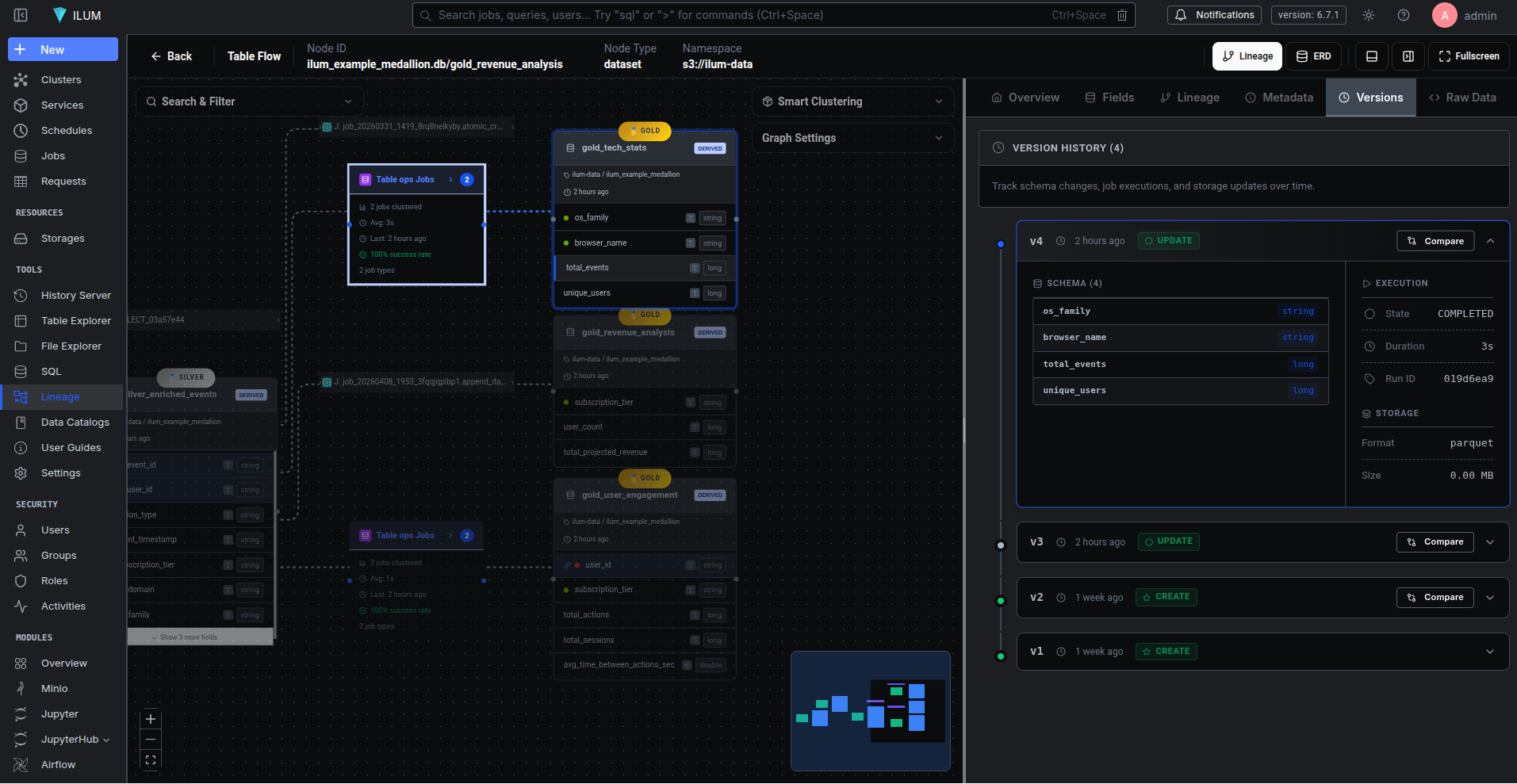
The lineage view shows a directed graph of datasets and jobs. Click a dataset node and you see its schema, upstream and downstream dependencies, column-level lineage, historical versions, and quality metrics. Click a job node and you see its run history - every execution with its START and COMPLETE timestamps, row counts, and success/failure status.
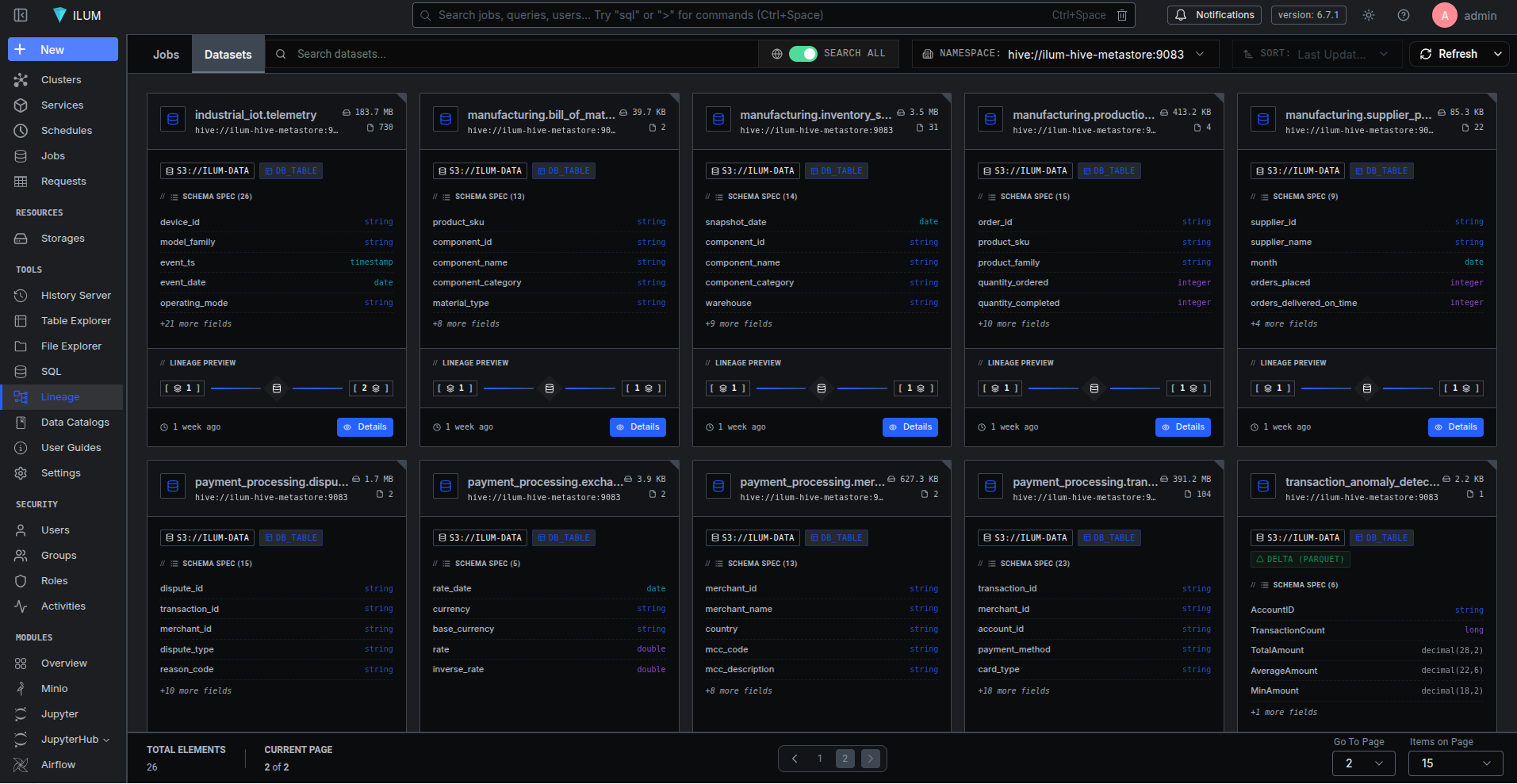
ilum also integrates DuckLake - a DuckDB-native catalog backed by PostgreSQL for metadata and S3 for data storage. Combined with duck_lineage, this gives you a persistent data catalog where every table has full lineage (from the extension's OpenLineage events), every schema change is versioned (by DuckLake's metadata layer), and every query is traced. The table explorer lets you browse schemas, inspect columns, view data file details, and run interactive queries - all without leaving the platform.
Try It in Five Minutes
The fastest way to see duck_lineage in action is the demo script, which starts Marquez, builds the extension, and runs a sample ETL pipeline:
git clone https://github.com/ilum-cloud/duck_lineage.git
cd duck_lineage
make demo
# Open http://localhost:3000 to see the lineage graph
The demo creates a four-layer ETL pipeline (source tables, staging joins, analytics aggregations, and an executive summary) and populates Marquez with the full lineage graph. From there, you can run your own queries in the interactive DuckDB session and watch them appear in the graph in real time.
For a deeper look at what the extension supports, check the test suite - it covers every query pattern from basic CTAS to column-level lineage through window functions, views, file operations, and multi-catalog setups.